

01 — 采集Capture
8 个平台,同一个按钮One button, eight platforms
ChatGPT、Claude、DeepSeek、Gemini、通义千问、Grok、豆包、Kimi。位置一致,多轮追问一样能串成一条。ChatGPT, Claude, DeepSeek, Gemini, Qwen, Grok, Doubao and Kimi. Same place, same multi-turn handling.
Chrome 扩展 · 本地优先 Chrome extension · Local-first
在 8 个平台的对话里点一下保存。420px 弹窗秒查,整页工作台深读,Markdown 直接落进你的本地文件夹。不注册账号,不上传云端。 Save any reply from ChatGPT, Claude, DeepSeek and five more. Search it in a 420px popup, read it full screen, and keep it as Markdown in your own folder. No account, no server.
怎么用How it works
对话里存一下,弹窗里查一下,文件落进自己的硬盘。每一步都短,不打断你手上的事。 Save inside the reply, look it up in the popup, keep it on your own disk. Each step is short and stays out of the way.
01 — 采集Capture
ChatGPT、Claude、DeepSeek、Gemini、通义千问、Grok、豆包、Kimi。位置一致,多轮追问一样能串成一条。ChatGPT, Claude, DeepSeek, Gemini, Qwen, Grok, Doubao and Kimi. Same place, same multi-turn handling.
02 — 检索Lookup
在任意标签页呼出,全文搜索、按模型筛选、代码一键复制。Open it from any tab: full-text search, model filters, clean code copy.
03 — 沉淀Keep
带 YAML frontmatter 写进本地目录。Obsidian、Cursor、本地 Agent 都能读。YAML frontmatter written to a local folder. Obsidian, Cursor and local agents all read it.
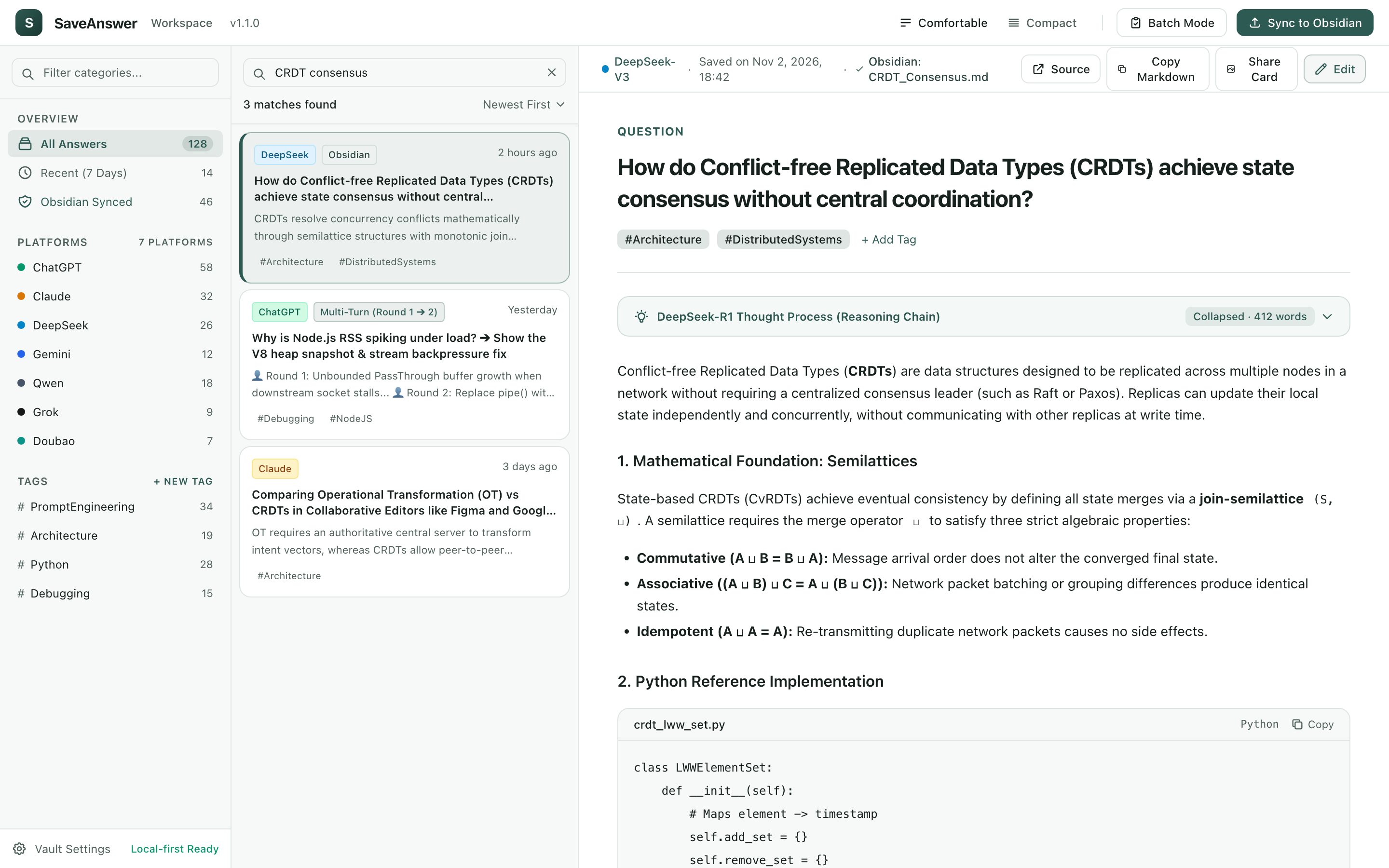
整页工作台The workspace
三栏布局:左边分类,中间检索,右边宽屏正文。语法高亮、思考链折叠、批量导出都在这里。弹窗右上角一键过去,不用重新找。 Categories on the left, search in the middle, wide reading on the right. Syntax highlighting, folded reasoning chains and batch export all live here — one click from the popup.
体验网页一键保存、420px 弹窗敏捷秒查、三栏桌面工作台与本地知识库直写。 Watch 1-click in-situ save, 420px agile popup, full-tab 3-column workspace, and direct local Obsidian sync.
和手动整理、云端收藏类插件放在一起看,差别在数据最终落在哪、上下文丢不丢。 Put next to manual saving and cloud bookmark extensions, the difference is where the data ends up and whether context survives.
手动复制 / 笔记粘贴Manual copy-paste
云端收藏类插件Cloud extension tools
SaveAnswer
关于 420px 弹窗与桌面工作台双模式、数据隐私安全性、本地知识库同步与免费承诺的解答。 Everything you need to know about the dual-tier workflow, local storage privacy, Obsidian sync, and free commitment.
420px 侧边弹窗是高频日常使用的第一层场景:在浏览网页或写代码时,随时呼出搜索历史问答、复制已保存的代码片段或临时打标签,无需中断当前工作流;当面对数千字的技术深度推导、多篇跨模型对比、或需要按复杂分类整理长文时,点击弹窗右上角一键跃迁至三栏全屏工作台,享受宽屏语法高亮与多选批量报告导出。The 420px popup is your daily high-frequency touchpoint: search saved answers in-situ, copy syntax-highlighted code snippets, and organize tags without switching windows. When you need deep technical reading, long code analysis, or cross-model report merging, click the top-right button to expand into the 3-column desktop workspace.
聊天记录搜索只能按单平台标题检索,且高价值结论深埋在海量闲聊与试错中。SaveAnswer 只收录你明确点过「保存」的有价值资产,跨越 ChatGPT、Claude、DeepSeek、Gemini 放在统一的三栏库中,按问题与回答全文秒级检索。Built-in history covers one platform and mixes good answers with countless throwaway chats. SaveAnswer keeps only the replies you explicitly pick, across ChatGPT, Claude, DeepSeek and more, in one full-text-searchable desktop library.
绝无任何上传。所有内容直接保存在当前浏览器的 chrome.storage.local 与你授权的本地目录中。没有后台服务器,没有用户分析与追踪代码,无需注册登录,扩展甚至不申请除目标 AI 域名之外的跨域网络权限。Zero servers. All saved answers live in your browser's local storage and your authorized local disk folder. There is no cloud backend, no telemetry, and no accounts required.
在扩展中点击「Obsidian」面板,授权你本地的知识库文件夹(如 SaveAnswer/)。每次保存问答时,扩展会直接通过浏览器底层 File System Access API 写入标准 Markdown 文件(附带完整 YAML Frontmatter)。Cursor、Claude Code 或 Cline 可直接通过 @Docs 或上下文规则将该目录作为私域经验库进行索引!Authorize your local notes directory via File System Access API. SaveAnswer writes atomic Markdown files with YAML frontmatter directly to disk. Any local agent (Cursor, Claude Code, Cline) can mount this folder as a verified knowledge base!
由于坚持 100% 纯本地优先,重装浏览器前建议打开全屏工作台,使用「批量模式」一键将所有收藏问答导出为 Markdown 压缩包或合并长报告;若开启了本地目录同步,文件已全部静默安全保存在你的硬盘中。Because data stays strictly local, use Batch Mode in the desktop workspace to export your library as a structured Markdown archive or enable direct-to-vault local sync before wiping your browser.
SaveAnswer 是一个 100% 免费、本地优先的个人生产力工具。没有 Token 订阅制、没有付费会员墙,核心功能始终无保留开放给全球开发者与研究人员使用。Yes, 100% free and local-first. No paid tiers, no token paywalls, and no subscription traps.
装好就能用,不用注册,也不用把对话交给第二台服务器。 Install it and start saving. No sign-up, and no second server holding your conversations.
8 个平台 · 100% 本地 · 无需账号 8 platforms · 100% local · no account